Building upgrade-safe custom Odoo modules, engineering patterns we use
Custom Odoo modules that survive upgrades are an engineering discipline, not an accident. The specific patterns we apply: inheritance over modification, single-responsibility modules, tests in CI, and beta-release testing.
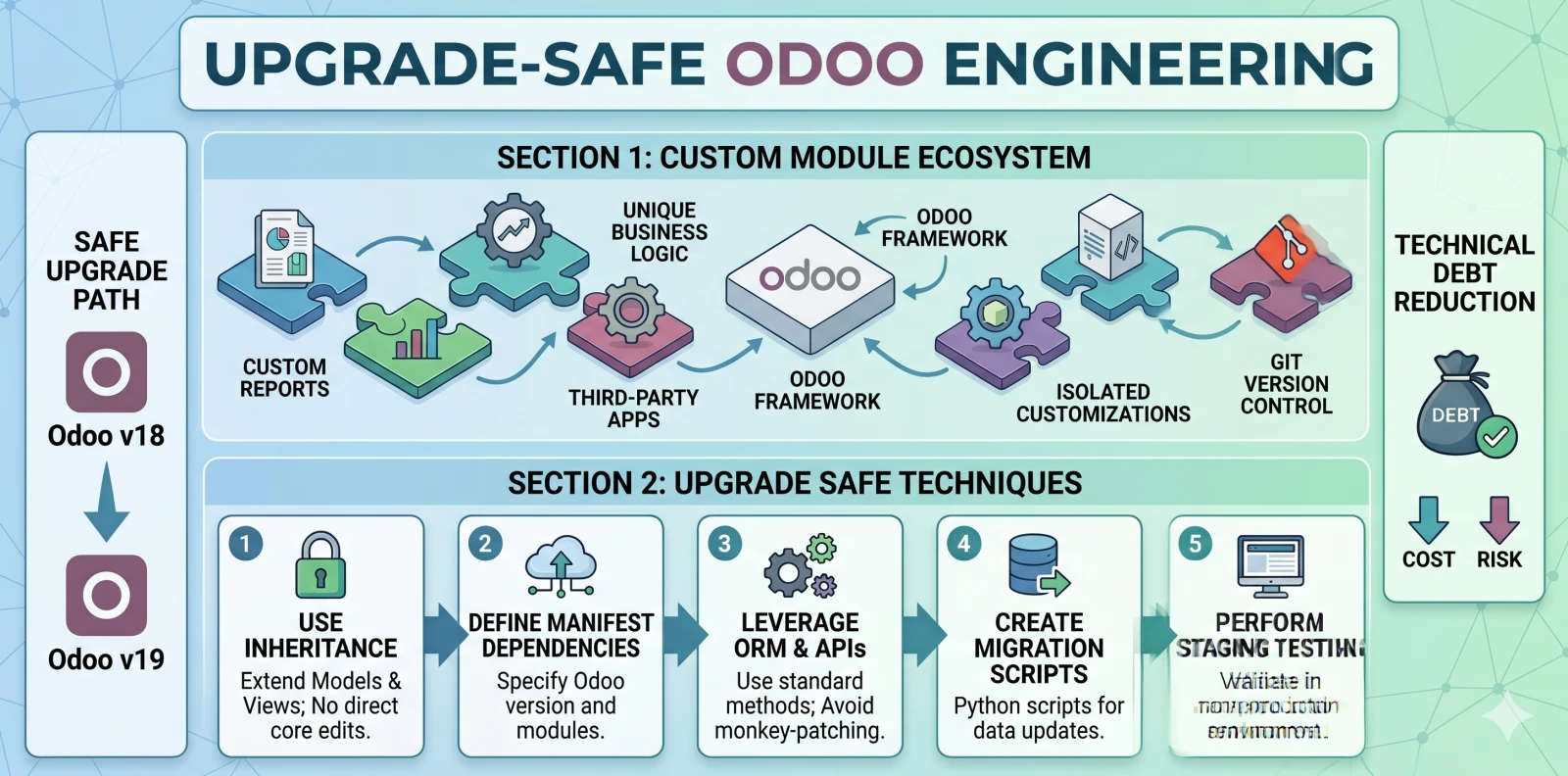
Why most Odoo customizations age badly
Odoo's flexibility is its most dangerous feature. The same open codebase that lets skilled partners fit the system to any business lets unskilled partners monkey-patch core, override methods unnecessarily, or copy-paste entire modules when clean inheritance would have sufficed. The result: a system that works on day one and breaks on every Odoo upgrade.
We've rescued enough custom-module disasters to know the failure modes cold:
- Customizations written into Odoo core modules (so upgrading core breaks them)
- Undocumented overrides nobody remembers creating
- Copies of core modules frozen at an old version because upgrading broke them
- Sales logic mixed with accounting logic in a single "helpers" module
- No tests, no CI, no documentation
By year three, the system is unmaintainable. The business either pays someone to re-platform (expensive) or stops upgrading Odoo (also expensive, plus security risk).
This doesn't have to happen. Odoo customization is engineering like any other. Applied with discipline, customizations survive a decade of upgrades. Here are the patterns we use.
Pattern 1: Always inherit, never modify
The single most important rule: zero modifications to Odoo core modules. Every customization is a separate module in our own namespace that extends Odoo via Python inheritance, field definitions, and view overlays.
This means:
- We never edit files under
addons/that came with Odoo - We never modify Odoo's database schema directly
- We add custom fields via
_inheritin our own module - We add custom business logic via Python class inheritance, not by forking Odoo's classes
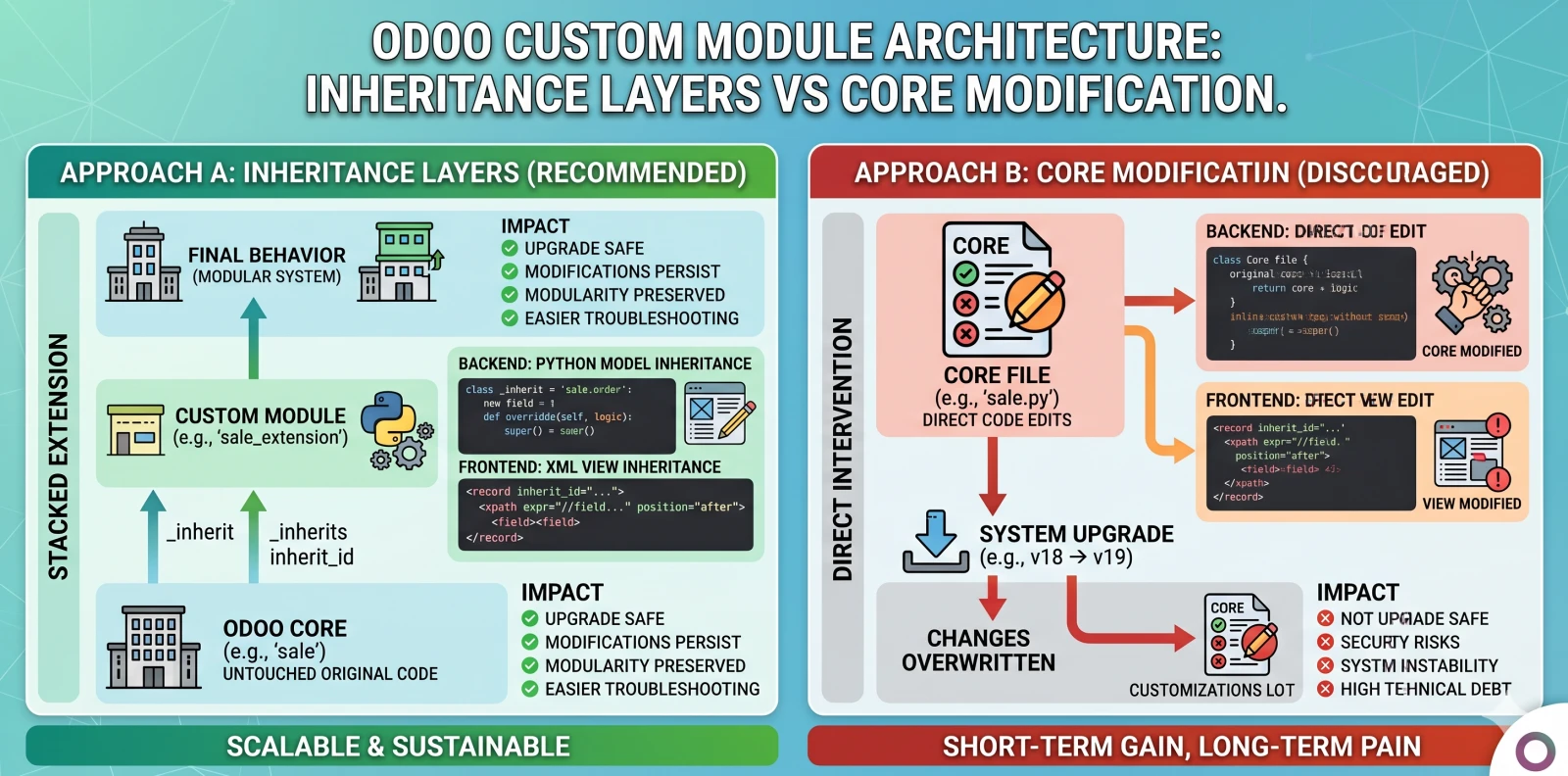
Why this matters: when Odoo ships v19 next year with refactored invoice handling, our inheritance sits on top of Odoo's new code. If we'd modified Odoo core directly, upgrading would mean manually re-applying our changes, error-prone and unscalable across dozens of clients.
Pattern 2: One module, one purpose
Each custom module has a clearly documented purpose and addresses a specific business domain. Accounting logic lives in an accounting module. Sales logic in a sales module. HR logic in an HR module.
Anti-pattern we see constantly: the "misc helpers" module that accumulates unrelated customizations because nobody wanted to create another module. By year two it has 40 unrelated features, no documentation, and everyone's afraid to change it.
Our module structure for a typical client:
netlinks_accounting_extensions/, accounting-specific custom fields and reportsnetlinks_sales_workflows/, sales-specific approval flows and CPQ extensionsnetlinks_manufacturing_traceability/, manufacturing lot-tracking extensionsnetlinks_customer_portal/, custom branded portalnetlinks_integrations_shopify/, Shopify-specific integration
Every module has:
README.mdexplaining purpose, owner, and dependenciesCHANGELOG.mdtracking version changes__manifest__.pywith proper metadata- Tests under
tests/
Pattern 3: Tests in CI
Every module ships with unit tests and integration tests. Tests run in CI against the current Odoo version on every commit, and against beta releases of the next version as soon as they're available.
We use Odoo's built-in test framework (odoo.tests.common.TransactionCase) for unit tests and HttpCase for end-to-end flows. Coverage target: 70%+ of custom business logic, 100% of security-sensitive paths.
Pattern 4: Code review always
No code merges without review by a senior engineer. Review checklist:
- Correctness: Does it do what the ticket says?
- Odoo conventions: Does it use
_inheritcorrectly? Compute methods declared? Fields have proper types? - Upgrade safety: Does it avoid unsafe patterns (monkey-patching, core modifications, private API usage)?
- Performance: Any N+1 queries? Indexes on custom fields that need them?
- Documentation: Module README updated? Changelog entry?
We've found that strict review discipline is what separates custom-module estates that scale from those that collapse under complexity.
Pattern 5: Version control with semantic versioning
Every module has a version number following semantic versioning:
- MAJOR version bump for breaking changes requiring data migration
- MINOR for new features that are backward-compatible
- PATCH for bug fixes
Modules are tagged in git. Deployments reference specific versions. Rollback is straightforward: redeploy the previous tag.
Pattern 6: Upgrade path tested before production
Before any Odoo version upgrade (v17 → v18, v18 → v19), we:
- Spin up a staging instance at the new Odoo version
- Install all our custom modules
- Run the full test suite
- Identify any failures
- Write remediation PRs to fix compatibility
- Re-run tests until clean
- Run data migration on a production copy
- Run smoke tests against migrated data
- Only then schedule the production upgrade
This is the single biggest determinant of upgrade success. Teams that skip it end up discovering compatibility issues at go-live, when rollback is the only option and users are waiting.
Pattern 7: Documented owner per module
Every module has a documented owner, typically a senior engineer who understands the module's design decisions and has authority to approve changes. When clients hire us for ongoing support, module ownership stays with us; when they internalize the team, we do structured handover.
Ownership matters because software without an owner accumulates undocumented workarounds until it becomes incomprehensible.
What we never do
- Modify Odoo core modules directly. Core is hands-off.
- Monkey-patch Odoo classes at runtime. Inheritance or overriding via manifest declaration only.
- Use Odoo's private API (anything prefixed
_in Odoo source) in ways that will break across versions. - Ship customizations without tests unless they're trivial UI-only changes.
- Deploy to production without staging validation.
- Copy-paste modules to duplicate functionality. Use inheritance.
A real example: custom invoice approval workflow
A client needed a 4-level approval workflow on invoices above certain amounts. Bad implementation: modify Odoo's account.move model directly to add approval fields and logic.
Our implementation:
- Module
netlinks_invoice_approval/with its own manifest - Model
netlinks.invoice.approvalstoring approval records with foreign key toaccount.move - Inherits
account.moveto add computed approval status (read-only, derived from approval records) - Adds menu, views, and wizards for approvers to act
- Security rules restrict who can create approval records
- 23 tests covering approval flow, edge cases, role-based access
- Runs against Odoo v17 current; tested against v18 beta; already tested on v19 alpha
Result: survived 3 major Odoo upgrades so far with zero code changes required.
Upgrade success rate
Across our client estates running custom modules:
- 98%+ upgrade success rate with no production downtime
- Median time to resolve upgrade compatibility issues: 4 hours of engineering
- Clients still on their original custom modules after 5 years: 87%
These are engineering outcomes, not luck. The patterns above are what deliver them.
Conclusion
Custom Odoo modules don't have to become tech-debt bombs. Applied with engineering discipline, always inherit, single-responsibility modules, tests in CI, code review, tested upgrade paths, they survive a decade of Odoo releases.
The cost of this discipline is 10-15% overhead on build time. The benefit is avoiding a $100K+ re-platform project in year 3-5.
If you've inherited custom Odoo code from a previous partner and aren't sure whether it's upgrade-safe, talk to us. We can audit the codebase and tell you honestly what's sustainable and what needs remediation.
Related reading: Odoo 19 vs 18, what changed · How to evaluate an Odoo implementation partner · The real cost of an Odoo implementation