Manufacturing ERP, shop-floor integration patterns that actually work
How to integrate Odoo ERP with MES, SCADA, and shop-floor systems for real-time manufacturing visibility. Architecture patterns from production deployments.
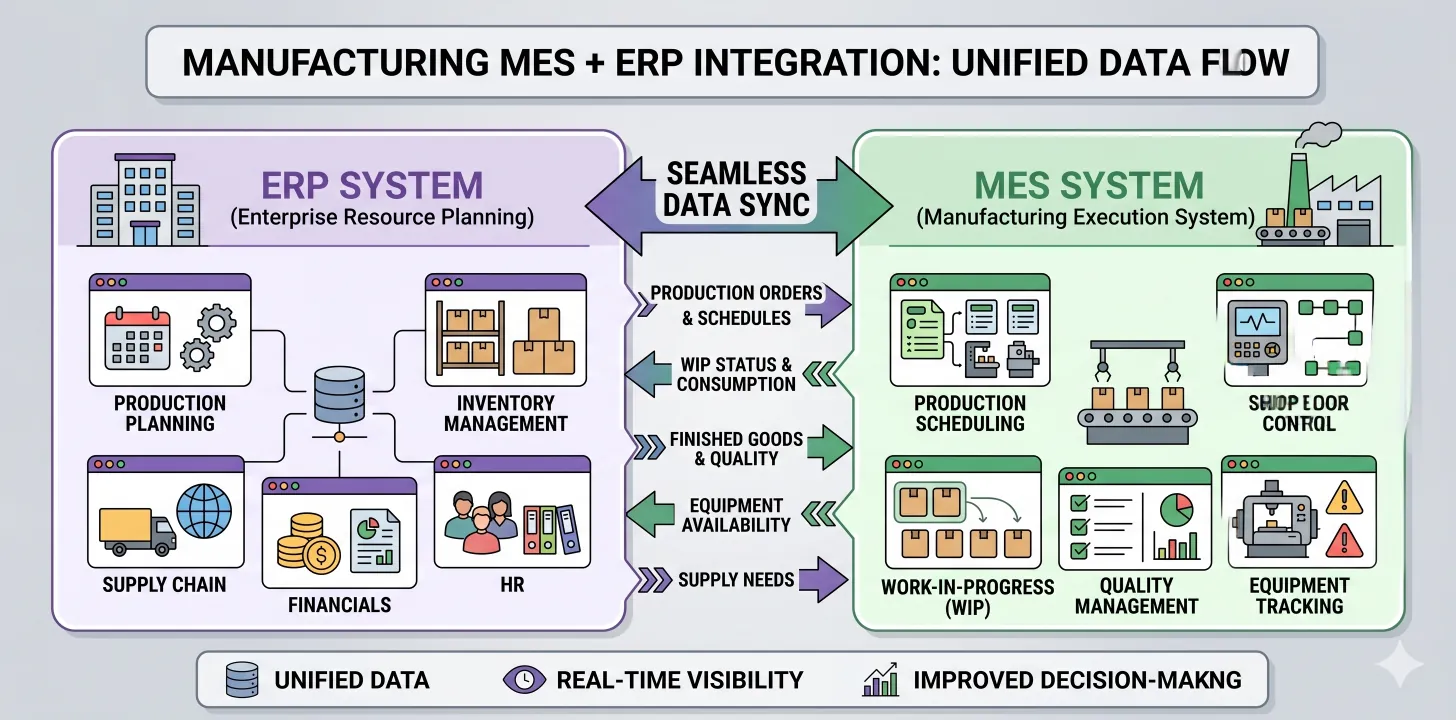
Why shop-floor integration matters
Manufacturing ERP without shop-floor data is half a system. You have inventory, BOMs, work orders, and costing in Odoo, but actual production is happening on physical equipment monitored by MES (manufacturing execution system) or SCADA (supervisory control and data acquisition). If those systems don't talk, you're running manufacturing with delayed, manually-entered data.
Typical consequences of weak integration:
- Work-order completion entered manually hours after actual completion
- Actual cycle times differ from standards; costs calculated on outdated standards
- Downtime tracked in a separate spreadsheet; maintenance scheduling disconnected from ops
- Quality issues surfaced by QA process after defective products are already shipped
- Scrap and yield variance unclear until month-end reconciliation
Proper integration fixes this. Real-time flow of production events into Odoo means costs are accurate, scheduling is reactive, and operations visibility exists at a glance.
The platforms we integrate with
Common shop-floor platforms we've integrated with Odoo:
- Ignition by Inductive Automation, most common mid-market MES/SCADA platform we see
- Wonderware / AVEVA, legacy but still widespread in older manufacturing operations
- Rockwell FactoryTalk, common in discrete manufacturing using Allen-Bradley PLCs
- Siemens Simatic IT, common in European operations using Siemens PLCs
- Bespoke MES platforms, custom-built for specific operations, varies widely
- Direct PLC integration, for simpler operations where no MES layer exists
Architecture patterns
Event-driven with queues
The pattern that works consistently for shop-floor integration:
- MES publishes events to a message queue (RabbitMQ, Kafka, Redis pub/sub)
- Event types: work order start/complete, material consumption, quality readings, downtime, scrap
- Odoo-side workers consume events and apply them to Odoo records
- Failures go to dead-letter queues with alerting
- Replay capability for missed or incorrectly-processed events
Why this pattern:
- Decouples MES and Odoo uptime, one can be down while the other continues
- Backpressure handling, no overwhelming either system during burst periods
- Retry with exponential backoff handles transient failures
- Dead-letter queues surface issues without dropping data
What NOT to do: direct synchronous calls
Don't make the MES call Odoo's API synchronously for every event. When Odoo has maintenance, MES backs up. When networks blip, events are lost. When scale grows, synchronous coupling becomes the bottleneck.
What data to flow through
Not every sensor reading belongs in Odoo. Flow data that drives operational or financial decisions:
Definitely flow into Odoo
- Work order completions, close out work orders with actual completion time, quantity produced, good/scrap counts
- Material consumption, decrement raw material inventory based on actual usage (often different from BOM standard)
- Quality events, rejected units, rework required, quality hold status
- Downtime events, equipment stops with start time, end time, cause code
- Setup and teardown time, for accurate standard cost comparison
Don't flow into Odoo
- Every sensor reading, temperature, pressure, flow readings at 1Hz would swamp Odoo. Keep these in the MES/historian.
- Video feeds, if your QA uses vision systems, keep the video in its own system; flow the pass/fail result to Odoo.
- Recipe-level SCADA data, chemical batch recipes and process parameters stay in the MES.
Real-time cost accounting
Once shop-floor data is flowing, real-time cost accounting becomes possible. Standard costs can be compared to actual as production happens:
- Actual labor hours per unit vs standard
- Actual material consumption per unit vs BOM
- Scrap variance
- Equipment utilization affecting overhead absorption
This visibility changes operations behavior. Problems surface within hours rather than at month-end close.
Specific integration examples
Ignition + Odoo
Typical approach:
- Ignition scripts publish events via MQTT to a broker
- Odoo worker subscribes to MQTT topics
- Events translated to Odoo operations (work order completion, inventory move, etc.)
- Ignition tag providers also let Odoo push planning data back (scheduled orders, priority changes)
Implementation cost: typically $25-45K depending on event volume and complexity.
Wonderware + Odoo
Wonderware is older, so integration often uses:
- OPC-UA bridge (Wonderware → OPC gateway → Odoo)
- Or historian export to CSV/SQL with scheduled batch imports
- For real-time needs, a middleware layer (like Kepware) bridges Wonderware's proprietary protocols to modern APIs
Implementation cost: $30-60K depending on how modern the Wonderware deployment is.
Custom PLC integration
For simpler operations without an MES layer:
- PLC data via Modbus, OPC-UA, or EtherNet/IP into a bridge service
- Bridge translates PLC states to business events (cycle complete, scrap counter incremented, etc.)
- Business events flow to Odoo
Implementation cost: $20-50K for a typical discrete manufacturing setup.
Common pitfalls
1. Over-capturing data
Flooding Odoo with every event creates noise and performance problems. Capture what drives decisions, aggregate everything else in the MES.
2. No canonical time source
Shop floor and ERP clocks drift. Timestamp every event in both systems; reconcile using a canonical time source (NTP-synced).
3. No idempotency
If an event is processed twice (e.g., after a retry), does it double-post to Odoo? It shouldn't. Use idempotency keys.
4. Work-order granularity mismatch
MES often tracks finer-grained operations than Odoo's work order structure supports. Plan the mapping carefully; sometimes it means reorganizing the Odoo routing structure.
5. Change control chaos
Shop-floor scripts that trigger Odoo events need change control. If a maintenance engineer tweaks an Ignition script on Wednesday and Odoo behavior changes, debugging is a nightmare without change logs.
Conclusion
Shop-floor integration is where mid-market manufacturing ERP pays off, real-time cost accounting, reactive scheduling, and operational visibility that spreadsheet-based manufacturing can't match. Architecture matters: event-driven with queues and retry logic, careful data scope, canonical time, and change control.
If you're running manufacturing on Odoo without shop-floor integration, or with weak integration, talk to us about getting to production-grade reliability.
Related reading: Manufacturing industry page · Real cost of Odoo implementation · Shopify + Odoo integration